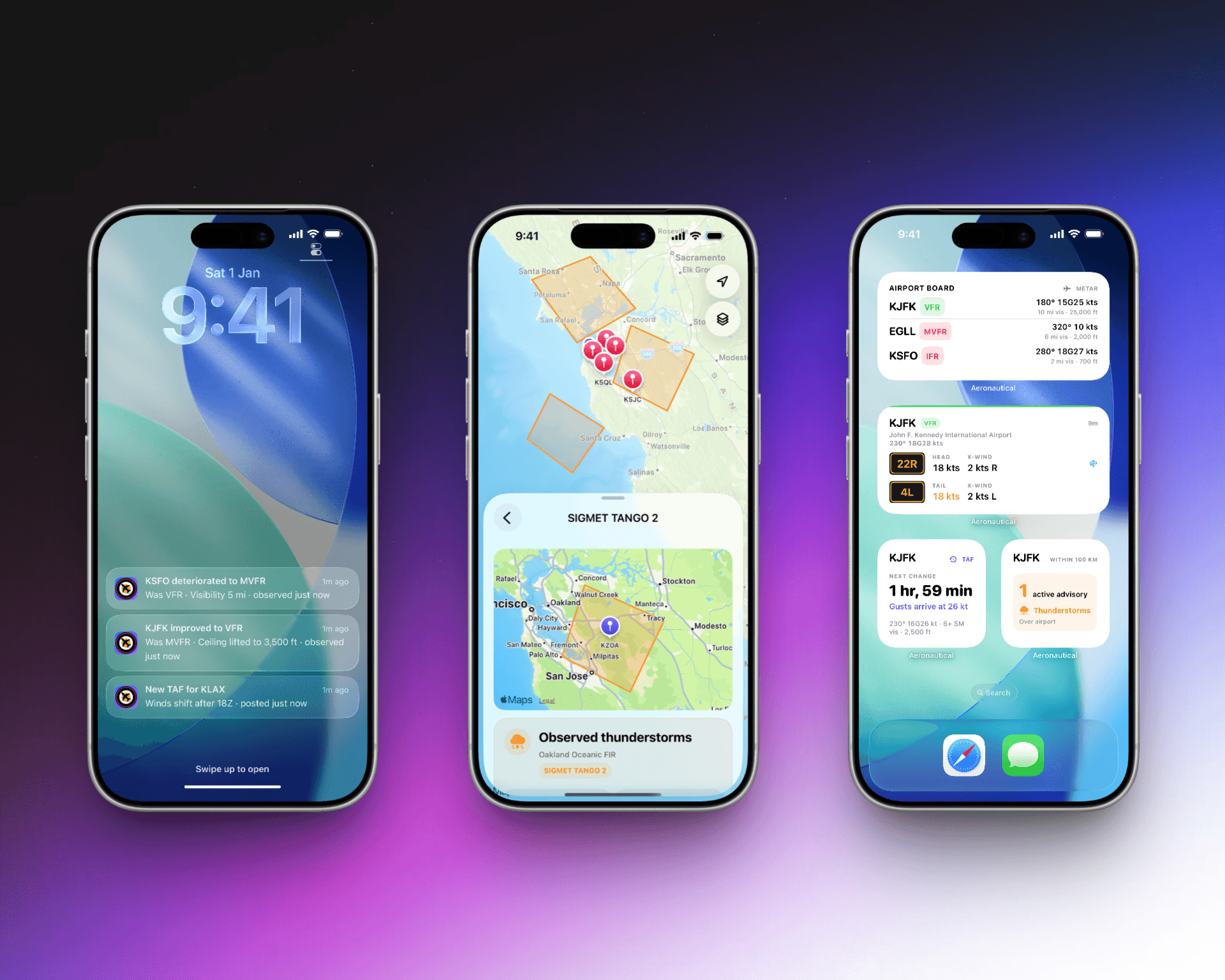
AeroNautical is an iOS app for exploring airports, weather reports, runway winds, NOTAMs, SIGMETs, and other aviation data. For its latest release, I wanted to add a simple-sounding feature: let someone watch an airport and receive a notification when its reported conditions change.
I had wanted to build something like this for years, but I never had a convincing way to do it. Every serious approach eventually became a polling problem. Something had to keep fetching reports while the app was not running, retain state between observations, and decide when a change mattered. The notification itself was cheap; the continuous monitoring behind it always looked too expensive and operationally heavy for an independent app.
The first version took less than a day to build. It ran entirely on the device, passed its tests, and produced the correct notification in the Simulator.
I deleted it the next day.
The code worked. The premise did not. iOS could not give the app enough background execution to support the expectation created by the feature. What eventually shipped required an iOS client, a small Cloudflare backend, durable state, queues, Apple Push Notification service, and considerably more failure handling than the notification itself.
Cloudflare Workers changed the calculation. Scheduled Workers, D1, Queues, R2, and the surrounding tooling provided the pieces for continuous monitoring without operating a traditional server or assembling several unrelated platforms. Cloudflare did not sponsor this post or the feature. I am calling them out because their platform made an idea I had repeatedly postponed practical to build and operate.
This post covers the problems and the lessons without getting into AeroNautical's exact notification policies or production configuration.
The First Design
The original plan had no server. The app stored a list of watched airports, periodically fetched fresh reports in the background, compared each report with the last observation, and posted a local notification when the flight category changed.
The transition logic was deliberately kept pure:
func detectChange(
  previous: ObservedCondition?,
  current: ObservedCondition
) -> ConditionEvent? {
  guard let previous else { return nil }
  guard previous.category != current.category else { return nil }
  return ConditionEvent(previous: previous, current: current)
}
There were a few ways to ask iOS for background execution. BGAppRefreshTask could request a future refresh. A widget timeline could request a reload. The app could also reconcile everything whenever it returned to the foreground.
The clever part was using the TAF to choose when to request those limited refreshes. If the forecast suggested a category transition around a particular time, the app could spend its background opportunity near that time instead of polling uniformly all day.
This made the implementation more efficient. It did not make it reliable.
What Didn't Work
Three assumptions failed before the server-driven version emerged.
Approach 1: Treating background refresh as a schedule
BGAppRefreshTask has an earliestBeginDate, which looks like a scheduling API until the word "earliest" receives the attention it deserves. It is a lower bound, not an appointment.
iOS decides whether the task runs based on app usage, battery state, network conditions, system budgets, and other signals outside the app's control. Low Power Mode can disable background refresh. Force-quitting the app can prevent it. A user who rarely opens the app is unlikely to receive a generous execution budget.
The local notification was dependable once the app posted it. The unreliable part was getting an opportunity to fetch the observation and reach that line of code.
That distinction matters. A screen that refreshes late is an inconvenience. A notification feature that silently fails creates a false expectation.
Approach 2: Scheduling notifications from forecasts
An earlier version tried to avoid background execution entirely by scheduling local notifications from the TAF. This would have made the notification arrive at the intended time, but it changed the meaning of the message.
A forecast describes what may happen. It can be amended, delayed, or simply wrong. A notification interrupts the user and reads like a statement of fact. Scheduling "IFR expected" hours in advance would have produced alerts that no longer matched the latest forecast, let alone the observed conditions.
The product rule became:
Forecasts belong in surfaces people choose to inspect. Push notifications report observed facts.
The TAF could still help explain what might happen next inside the app. It could not be the authority for an interruption.
Approach 3: Assuming a state change is just a diff
Comparing two values is easy. Deciding whether the comparison is meaningful is not.
The first observation after a user starts watching an airport must establish a silent baseline. A report arriving out of order must not move state backwards. A station returning after a long reporting gap may need a new baseline instead of a notification. Missing data is not a new category. Replayed input must not create a second event. Rapidly oscillating reports need suppression without hiding a genuine deterioration.
The notification feature was becoming a distributed state machine even before it had a server.
At that point, continuing with the on-device design would have meant polishing a mechanism that could never support its own user experience. I removed the implementation and kept the pure transition tests. Those tests became the foundation for the backend version.
The Server-Driven Design
The replacement uses three small Cloudflare Workers with separate responsibilities:
- An API Worker records devices and the airports they want to watch.
- An ingest Worker fetches the relevant public aviation reports, validates them, and compares them with durable state.
- A push Worker fans qualifying events out to subscribers and delivers them through APNs.
At a high level, the system looks like this:
iOS app ──> registration API ──> subscriptions
                                  │
aviation data ──> ingest ──> state + events ──> queue ──> push ──> APNs
The split is operational rather than aesthetic. Ingesting and validating a report should not wait for thousands of network calls to Apple. A temporary APNs failure should not cause the same aviation report to be downloaded again. Device registration should not share a deployment lifecycle with scheduled ingestion.
Durable storage holds the last accepted observation and pending events. Queues isolate fan-out and retries. Object storage temporarily retains source snapshots for debugging. Operational flags make it possible to run ingestion without sending notifications, restrict delivery during rollout, or stop fan-out without redeploying the system.
The exact polling schedule, transition policy, storage schema, and rollout controls are intentionally omitted here. They are product and operational details rather than requirements for understanding the architecture.
Challenge 1: Prefer Silence to a False Notification
The most important backend rule is not latency. It is that the backend must not create a false condition change.
External data is allowed to be late, incomplete, duplicated, reordered, or structurally different from what the parser expects. A permissive system could interpret any of those cases as thousands of airport transitions.
The ingest path therefore fails closed. A candidate snapshot is validated before it can replace the accepted world state. Reports move forward in observation time. Missing categories remain missing rather than becoming a synthetic state. Suspiciously large changes stop the run instead of generating events.
The simplified decision is:
if (!previous) return establishBaseline(current);
if (!isFresh(current)) return keepPreviousState();
if (!isForwardInTime(previous, current)) return ignore();
if (!qualifies(previous, current, preference)) return updateStateOnly();
return createEvent(previous, current);
This creates an intentional asymmetry: delayed delivery is measurable and recoverable, while an incorrect alert cannot be taken back after it appears on a Lock Screen.
Challenge 2: At-Least-Once Is Not Exactly-Once
Cloudflare Queues, like most practical queue systems, can redeliver a message. There is also a narrow failure window between a queue accepting an event and the database recording that acceptance.
Pretending this provides exactly-once delivery would only move the bug into production.
The backend instead uses deterministic event identities, idempotent state transitions, and an outbox that can recover work after a failed scheduled run. Queue consumers tolerate seeing the same work again. APNs collapse identifiers reduce stale queued notifications on offline devices. Every stage records a correlation identifier without logging the device token.
This does not make every visible notification mathematically exactly once. APNs does not offer that guarantee. It makes duplicates bounded, observable, and much less likely while ensuring a process crash cannot silently lose the underlying event.
Challenge 3: APNs Has Two Token Lifecycles
"The APNs token" can mean two different things.
Each app installation receives a device token that may change and belongs to either the sandbox or production environment. Separately, the backend authenticates itself to APNs with a short-lived provider token signed using an Apple-issued key.
Both lifecycles produced useful failures during staging.
The first backend contract assumed every device token had the same byte length. A Simulator immediately disproved that assumption. The correct validation was structural rather than based on one observed length.
The first provider credential produced correctly formed JWTs that Apple still rejected. Cryptographic validity did not imply that the credential was enabled for the service. The only meaningful end-to-end proof was APNs accepting a request.
Provider tokens also need coordinated refresh. Serverless isolates can wake simultaneously, and allowing each one to mint a replacement after a cache miss creates a token-refresh stampede. The final design has one authoritative token state, an expiring lease for minting, and an overlap where both the previous and current provider tokens remain usable.
The general lesson was that a cache can improve this path, but it cannot be the authority for coordination.
Challenge 4: Registration Is an Asynchronous State Machine
The iOS side originally treated notification setup as a sequence:
- Ask for permission.
- Register with APNs.
- Receive a token.
- Send the subscription to the backend.
In reality, those steps are callbacks separated by app launches, connectivity changes, and user decisions. The token may already exist, arrive later, rotate, or fail to arrive during the current session. The backend may be temporarily unavailable after the user has already expressed the desire to watch an airport.
The authorization model had its own trap. I initially considered provisional authorization because it avoids showing a system prompt. On iOS, provisional notifications are delivered quietly to Notification Centre, without a banner or sound. Implementing foreground presentation does not override that behavior. For a feature someone explicitly enabled because they wanted to be notified, quiet delivery defeated the point. The app now asks for full authorization at the moment the user chooses to watch an airport, where the prompt has context and intent.
A single isWatching Boolean could not represent this honestly. The app needed distinct states for setting up, waiting for synchronization, active, permission-disabled, entitlement-limited, and temporarily unavailable.
The local watch list represents desired state. The UI shows a watch as effective only after the backend acknowledges it. Failed synchronization retries with bounded backoff. Returning to the foreground reconciles notification permission and registration again.
One post-implementation bug came from assuming that calling registerForRemoteNotifications() was enough. If the device token did not arrive during that action, no later event necessarily retried the backend synchronization. The fix was not another Boolean; it was making token acquisition and subscription synchronization resumable operations.
Testing the Entire Path
Unit tests covered parsers, category transitions, stale observations, baselines, event identities, subscription rules, queue redelivery, provider-token rotation, and APNs response classification. Worker integration tests applied the real database migrations against local Cloudflare bindings.
That still did not prove the feature.
The staging test used a real iOS Simulator registration, a controlled airport state transition, the deployed ingest Worker, the real queues, the deployed push Worker, sandbox APNs, and the Simulator Lock Screen. That path found problems no isolated test had exposed:
- Swift's synthesized encoder omitted an optional field while the backend expected an explicit
null. - A database migration was marked as applied while one expected table was missing.
- The initial ingest strategy exceeded the available serverless CPU budget.
- A freshness rule that looked conservative rejected normal reporting intervals.
- A valid-looking Apple credential was not valid for APNs delivery.
- Notification localization needed versioned format keys when the number of arguments changed.
The ingest strategy was narrowed to the airports someone actually watches. CPU usage fell dramatically, and the architecture became cheaper at the same time. Freshness became a per-station decision rather than a property of an entire response. Localization keys remained backward compatible so an older app could still render a notification from a newer backend.
The test was complete only when the controlled notification appeared on the Lock Screen with the expected localized title, body, and observation age.
The Result
AeroNautical can now monitor watched airports on the server and send notifications for observed condition changes. Users can separately opt into newly published METAR and TAF reports. Notifications use the app's localization resources, identify the observation time, and open the relevant airport while the app fetches the current report again.
The backend can ingest without delivering, roll delivery out gradually, retry transient failures, stop on provider-authentication errors, and delete tokens that Apple confirms are no longer registered. Free and paid users travel through the same delivery path; product access changes breadth and control, not reliability.
Most importantly, the shipped feature does not depend on iOS deciding to wake the app at the right moment.
What I Learned
-
Background refresh is an opportunity, not a schedule. If a feature's promise depends on periodic execution, it needs an authority outside the device.
-
A push notification should report a fact. Forecasts can guide attention, but an interruptive surface needs stronger semantics than a screen the user chose to open.
-
The first observation is a baseline, not an event. This small rule prevents a new subscription, reinstall, or long reporting gap from creating a misleading alert.
-
Distributed delivery is a state-machine problem. Idempotency, ordering, staleness, retries, and partial failure matter more than formatting the payload.
-
Fail closed when incorrect output is worse than missing output. Silence during malformed or suspicious upstream data is preferable to confidently sending the wrong condition.
-
Serverless caches are not coordination primitives. Eventually consistent caches are useful only after an authoritative state and a single-writer mechanism exist.
-
Test the path that crosses company boundaries. A passing Swift test, Worker test, and JWT test still do not prove that Apple accepted and displayed the notification.
-
UI state is part of reliability. "Watching" is a claim about local permission, APNs registration, backend synchronization, and server acknowledgement. The interface must not collapse those into a hopeful Boolean.
AeroNautical is available on the App Store.